
BitRealty app conversation alerts
BitRealty, LLC operates both BitRealty.com and the BitRealty mobile app. The website provides public real-estate information and property search. The app is an invitation-only private beta distributed on iPhone through TestFlight, with signed-in client and agent accounts and property-inquiry conversations.
This SMS program is for those app accounts: an opted-in agent can receive an alert when a client sends an inquiry or reply, and an opted-in client can receive an alert when their agent replies. Each recipient separately chooses SMS for their own account. These are account notifications about the recipient’s own app conversations, not marketing, property-listing promotions or texts to website leads.
The public website’s contact, valuation and live-chat forms do not enroll visitors in this app SMS program. Enrollment takes place inside the signed-in app, not on this page. A TestFlight invitation or a saved phone number alone does not provide SMS consent.
Your choice, separate from sign-in
Signing in uses email or a password. A phone number and SMS consent are not required to access BitRealty, search homes or use in-app conversations. SMS starts off for new accounts. Saving a phone number alone does not enroll you. You may leave SMS off and return to your account at any time.
Enrollment steps
- Sign in to your invited BitRealty account and open Account → Notifications.
- Read the SMS disclosure, Privacy Policy and SMS Terms and Conditions.
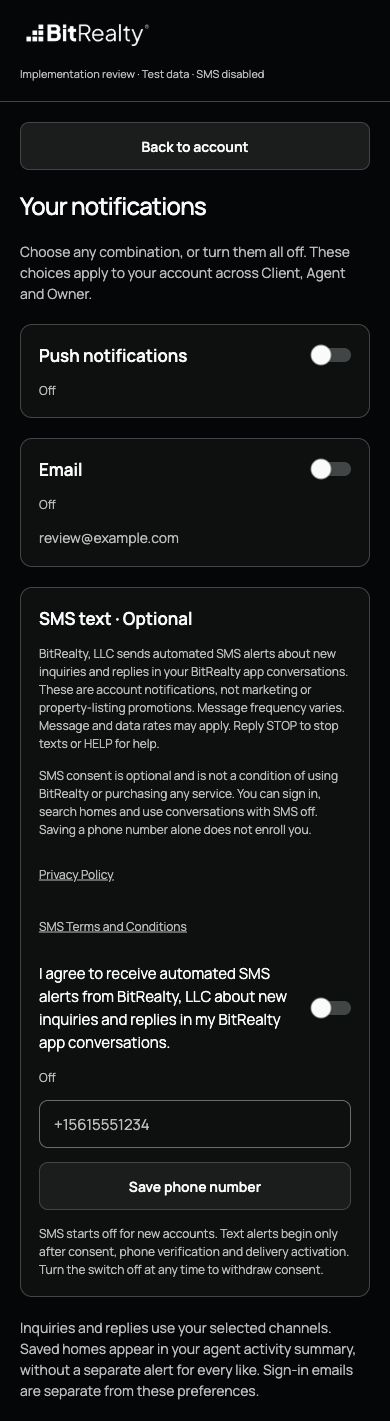
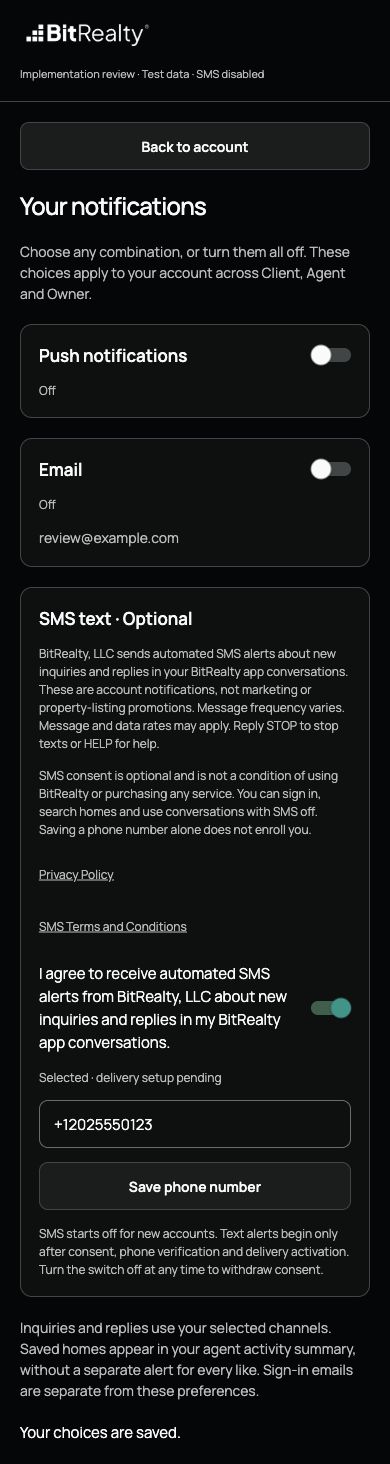
- If you want texts, save your own phone number and separately turn on “I agree to receive automated SMS alerts from BitRealty, LLC about new inquiries and replies in my BitRealty app conversations.”
- When verification is available, request a code and enter it in the app to verify phone ownership. Alerts begin only after verification and delivery activation.
- To withdraw consent, turn SMS off or reply STOP. You retain access to the app.
Disclosure shown before consent
BitRealty, LLC sends automated SMS alerts about new inquiries and replies in your BitRealty app conversations. These are account notifications, not marketing or property-listing promotions. Message frequency varies. Message and data rates may apply. Reply STOP to stop texts or HELP for help. SMS consent is optional and is not a condition of using BitRealty or purchasing any service.
Consent choice
The separate switch reads: I agree to receive automated SMS alerts from BitRealty, LLC about new inquiries and replies in my BitRealty app conversations.
Example of the text you will receive
“You have a new BitRealty inquiry or reply. Open BitRealty to view your conversations. Reply STOP to unsubscribe. HELP for help.”
This is the application’s alert template. It directs you back to your own conversations without including client names or message contents in the text. It does not send property offers or start a conversation by SMS.
Enrollment screen evidence
These screenshots show the actual updated app component rendered in a local implementation review with test-only account data. They are not proof of live enrollment or SMS delivery. The app itself is in private TestFlight beta; the revised consent screen shown here is awaiting beta distribution. Delivery remains disabled pending approval, verification and activation. These public screenshots let reviewers inspect the consent wording without a TestFlight invitation or access to private accounts. Test interactions do not contact Twilio.
Help and privacy
For help, email rbeckett@bitrealty.com or read app support. Read our SMS privacy information and SMS Terms and Conditions.